🔍 سير عمل البحث الذكي عن وظائف — Claude Cowork × Apify × VibeProspecting
كنت تدور على وظائف يدوياً كل يوم — لحد ما سويت هذا. ربطت Apify مع VibeProspecting داخل Claude Cowork مباشرةً عبر Connectors، وصار يجيبلي الوظائف مرتّبة حسب score لعندي كل صبح تلقائياً — مع CV تبعتي. مو تحتاج تكتب أي شي. بس تصحى تلقى الملف جاهز.
الهدف: قائمة وظائف حديثة مرتّبة حسب درجة التطابق مع سيرتك الذاتية — تلقائياً كل صباح — بدون مغادرة Claude Cowork.
خريطة سير العمل
لمن هذه الصفحة؟
- الباحثون عن عمل الذين يريدون تسريع عملية البحث
- المحترفون الذين يريدون وظائف مطابقة لملفهم لا مجرد قوائم عشوائية
- أي شخص يريد أن يصحى كل صباح على قائمة وظائف جاهزة بدون تدخل يدوي
ملاحظة عن اللغة
البرومبت مكتوب بالإنجليزية عمداً — أدوات البحث وAPIs وإخراج الجداول تعمل بشكل أفضل بالإنجليزية.
الأدوات المطلوبة
| الأداة | الدور | المصادقة | التكلفة |
|---|---|---|---|
| Claude Cowork | طبقة التنسيق المركزية | حساب Claude | مشمول في خطة Claude |
| Apify — LinkedIn Jobs Scraper | سحب وظائف LinkedIn | API Token (مجاني للبداية) | Free tier متاح |
| VibeProspecting | تقييم التطابق مع ملفك | تسجيل دخول — بيتا خاص حالياً | Waitlist مجاني |
| سيرتك الذاتية | معيار المقارنة | — | — |
ملاحظة: VibeProspecting في بيتا خاص حالياً. إذا لم يكن Connector متاحاً لك بعد، يمكنك تشغيل الـ workflow بـ Apify فقط وإضافة VibeProspecting لاحقاً حين يُطلق للعموم.
الخطوات — كل شيء داخل Claude Cowork
الخطوة 1 — افتح Claude Cowork
اذهب إلى claude.ai/cowork وسجّل دخولك. ابدأ محادثة جديدة.
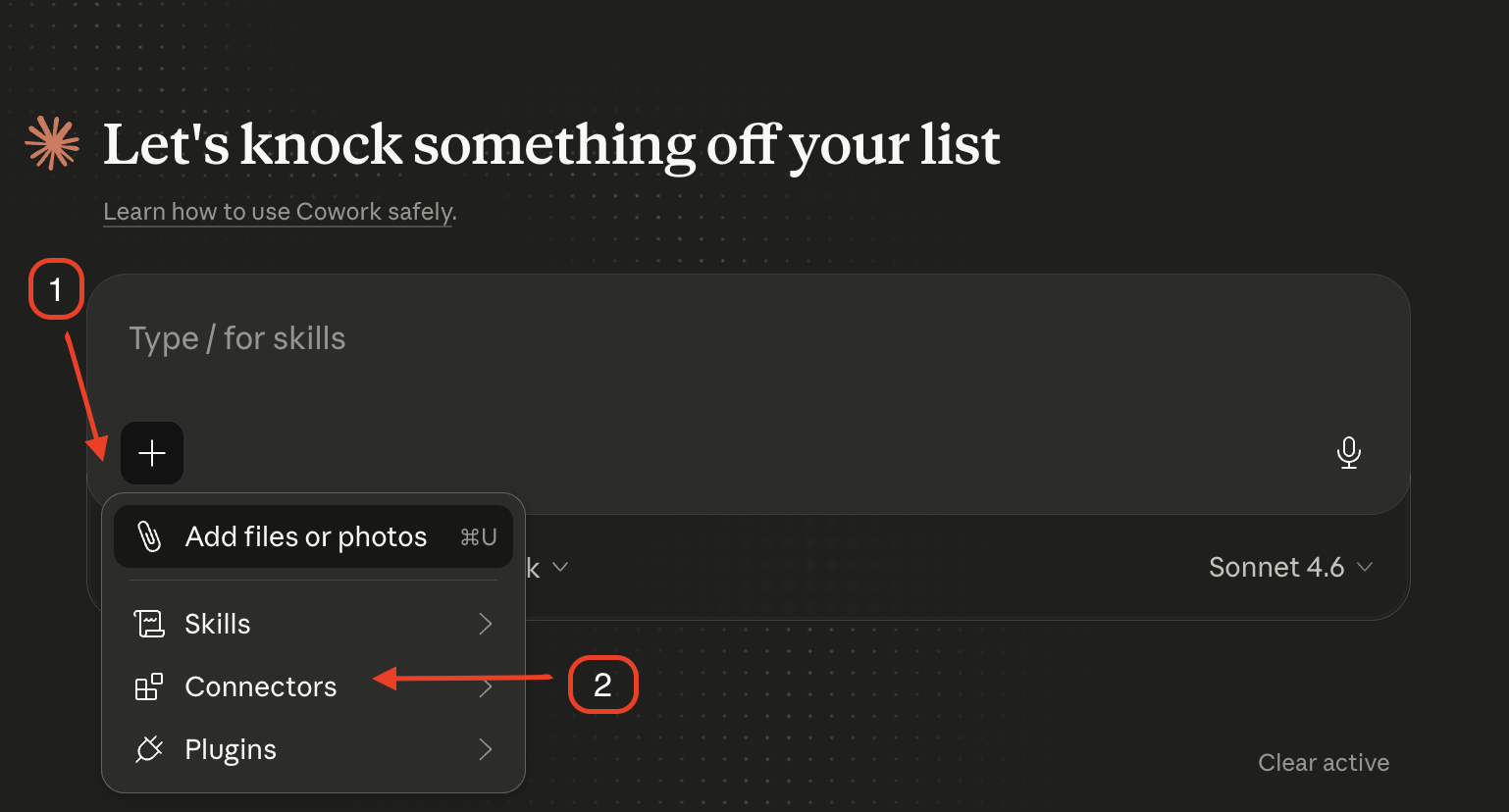
الخطوة 2 — اضغط على زر + واختر Connectors
في أسفل مربع الكتابة، اضغط + ثم اختر Connectors من القائمة.
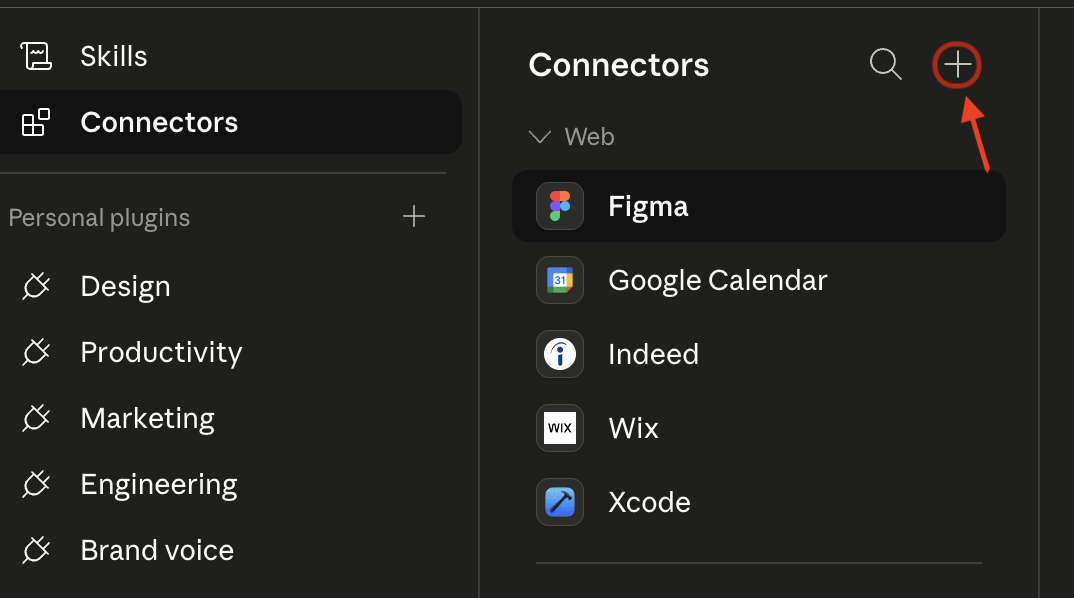
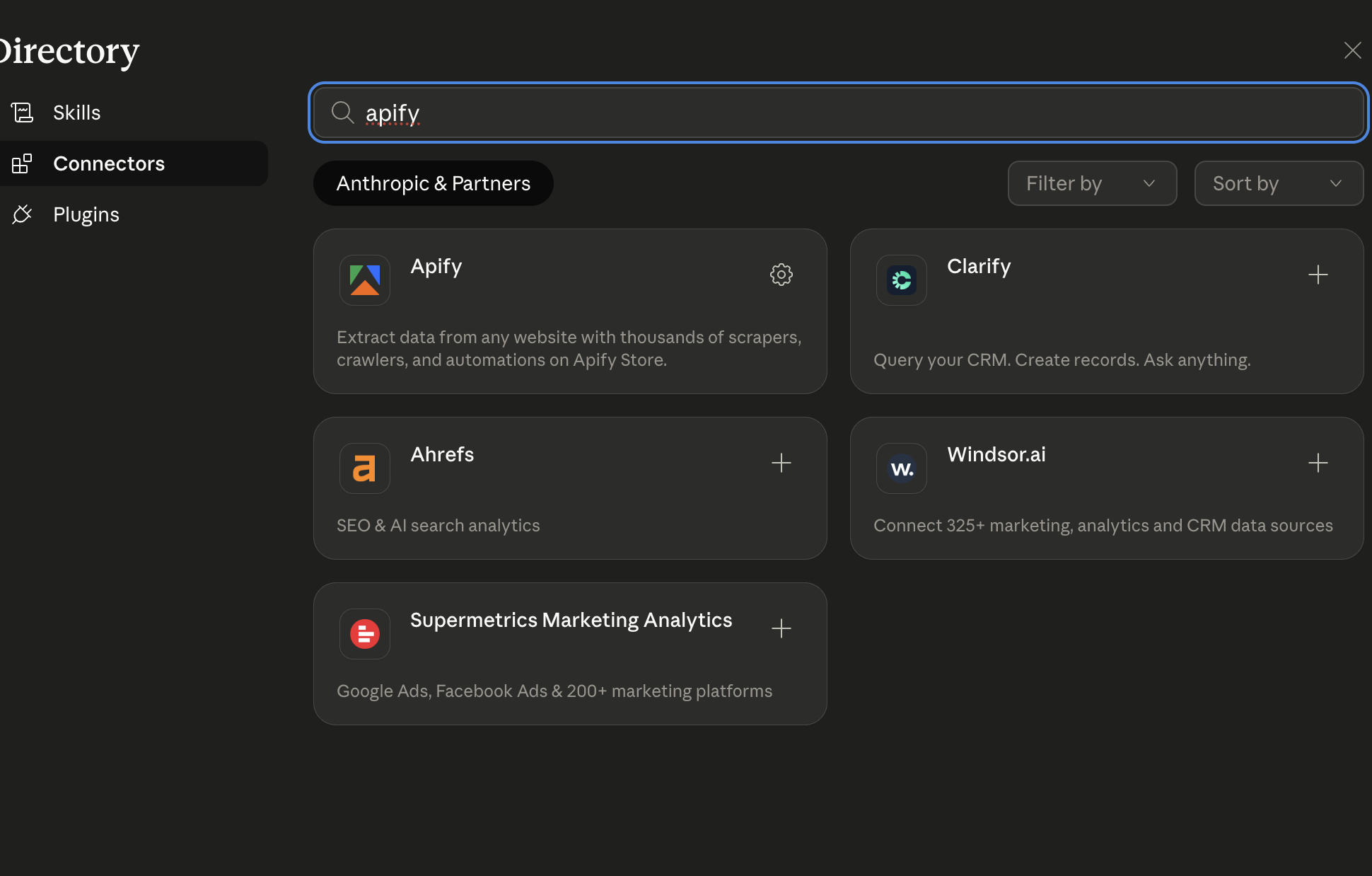
الخطوة 3 — فعّل Apify و VibeProspecting
ابحث عن Apify واضغط + لتفعيله. ثم ابحث عن VibeProspecting واضغط + أيضاً.
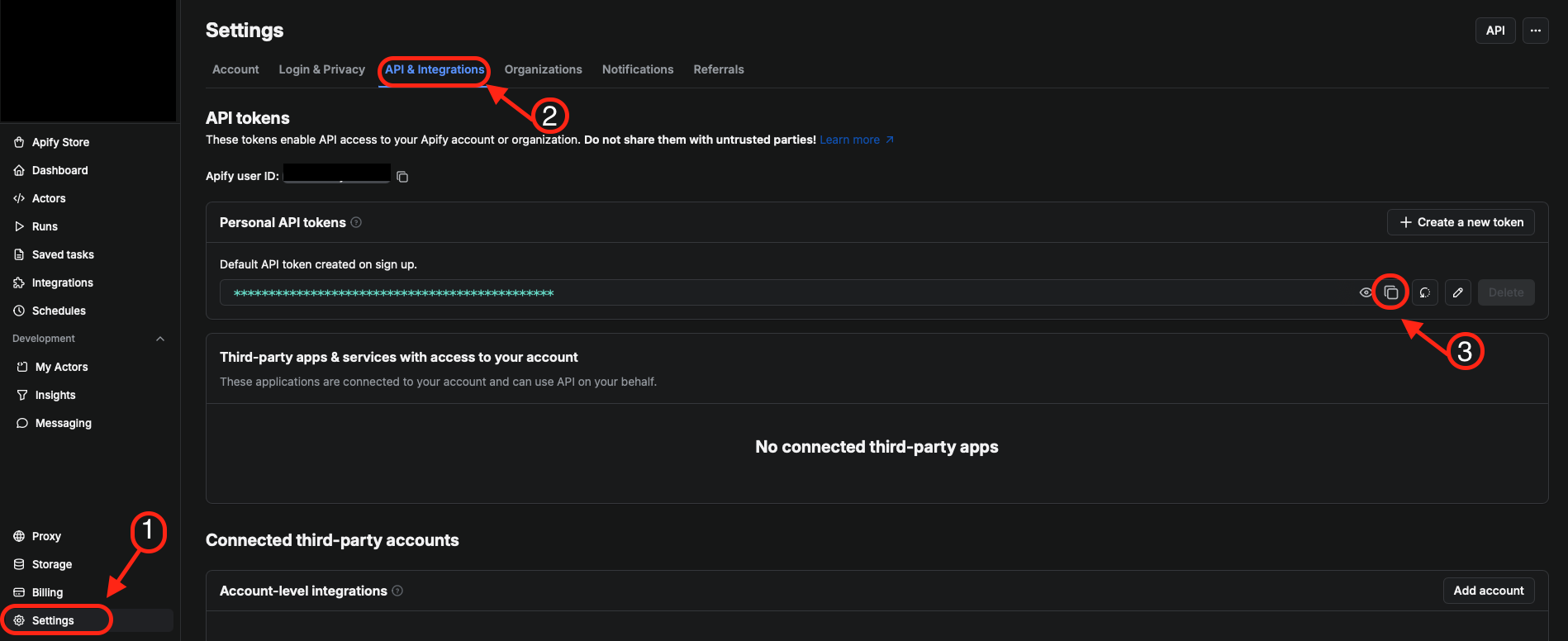
الخطوة 4 — احصل على Apify API Token والصقه
افتح تبويباً جديداً وانتقل إلى Apify Console ← Settings ← Integrations. انسخ الـ API Token الخاص بك، ثم عُد إلى Cowork والصقه داخل مربع المصادقة الخاص بـ Apify Connector.
الخطوة 5 — أضف سيرتك الذاتية وشغّل البرومبت
عندك خياران لإدخال سيرتك الذاتية — اختر الأنسب لك:
الخيار أ — لصق النص (الأسرع): انسخ نص سيرتك الذاتية والصقه مكان [PASTE CV HERE] في البرومبت أدناه. الأفضل للـ CVs بتنسيق نصي بسيط.
الخيار ب — إرفاق ملف (الأدق): اضغط على زر المرفق 📎 في Cowork قبل إرسال البرومبت وارفع ملف CVتبعك (PDF أو DOCX أو TXT). ثم اكتب (see attached CV) مكان [PASTE CV HERE]. الأفضل للـ CVs ذات التنسيق المعقد. إذا فشل الرفع، انتقل للخيار أ.
You have access to Apify (LinkedIn Jobs Scraper) and VibeProspecting via your connected tools.

**My CV / Resume:**
[PASTE CV HERE — or write "(see attached CV)" if you uploaded the file]

**Target city:** [YOUR CITY, e.g., Riyadh / Dubai / London / Remote]

---

**Task:**

Step 1 — Use the Apify LinkedIn Jobs Scraper connector to pull job postings from LinkedIn in [YOUR CITY] published in the past 24 hours.

Step 2 — Use VibeProspecting to evaluate each role against my CV and assign a fit score out of 10 based on:
- Role alignment
- Responsibilities overlap
- Required skills match
- Relevant experience
- Seniority level match

Step 3 — Merge and deduplicate all results.

**Output format — return only this table, no commentary:**

| Role | Company | Posted | Source | Fit Score | Apply Link |

**Filtering rules:**
- Include only jobs posted in the last 24 hours
- Include only jobs with a fit score above 7
- Sort by: highest fit score first, then most recent
- Limit to top 10 results
- Keep scoring strict — avoid inflated ratings
الخطوة 6 — جدوِل البرومبت يومياً
بعد أن تتأكد أن النتائج صحيحة، استخدم ميزة الجدولة في Cowork لتشغيل هذا البرومبت تلقائياً كل صباح. أو بديلاً، فعّل Scheduled Run مباشرةً من Apify Console لتشغيل السكريبر كل ليلة ثم تشغيل البرومبت صباحاً.
علامات الناتج الجيد
- الجدول يحتوي فقط الأعمدة الستة المطلوبة
- جميع الوظائف منشورة خلال آخر ٢٤ ساعة
- درجات التطابق منطقية — لا توجد درجات ٩ أو ١٠ لوظائف غير ذات صلة
- روابط التقديم تعمل وتشير مباشرة للإعلان الأصلي
- لا يوجد تعليق إضافي خارج الجدول
أخطاء شائعة
- نسيان إضافة CV: بدونه لا يستطيع Cowork حساب درجة التطابق بدقة
- Apify API Token منتهي أو غلط: تأكد من صلاحيته في Apify Console
- VibeProspecting Connector غير متاح بعد: احذف Step 2 وشغّل بـ Apify فقط مؤقتاً
- مدينة غير محددة: استخدم اسم المدينة بالإنجليزية — مثل "Riyadh" لا "السعودية"
- حد تطابق منخفض: ٥ أو أقل يعطيك وظائف غير مناسبة — الافتراضي ٧ هو الأنسب
كيف تحسن النتيجة؟
- وسّع نافذة الوقت إلى "past 48 hours" إذا كانت النتائج قليلة
- خفّض الحد الأدنى إلى ٦ إذا أردت عدداً أكبر
- أضف كلمات مفتاحية تقنية محددة من CVتبعك لتحسين دقة التطابق
🔍 Claude Cowork × Apify × VibeProspecting — Smart Job Search Workflow
Connect Apify and VibeProspecting as Connectors inside Claude Cowork. Run one prompt. Get a daily ranked job list against your CV — automatically every morning, without leaving Cowork.
Goal: A ranked, recent job shortlist matched to your resume — delivered automatically each morning with zero manual searching.
Workflow map
Who is this for?
- Job seekers who want to automate their daily search
- Professionals who want role-matched results, not random listings
- Anyone who wants to wake up to a ready ranked shortlist every morning
Language note
The prompt is in English — search tools, APIs, and table output work better in English.
Tools required
| Tool | Role | Auth | Cost |
|---|---|---|---|
| Claude Cowork | Central orchestration layer | Claude account | Included in Claude plan |
| Apify — LinkedIn Jobs Scraper | Scrape LinkedIn job postings | API Token (free tier available) | Free tier available |
| VibeProspecting | CV-fit scoring | Sign in — private beta | Free waitlist |
| Your CV / resume | Scoring benchmark | — | — |
Note: VibeProspecting is currently in private beta. If the Connector isn't yet available to you, run the workflow with Apify only and add VibeProspecting later when it opens up.
Steps — everything inside Claude Cowork
Step 1 — Open Claude Cowork
Go to claude.ai/cowork, log in, and start a new conversation.
Step 2 — Click + and choose Connectors
At the bottom of the chat composer, press + then select Connectors from the menu.
Step 3 — Activate Apify and VibeProspecting
Search for Apify and click + to activate it. Then search VibeProspecting and click + to activate it too.
Step 4 — Get your Apify API Token and paste it
Open a new tab, go to Apify Console → Settings → Integrations, copy your API Token, then return to Cowork and paste it into the Apify connector's auth dialog.
Step 5 — Add your CV and run the prompt
Two ways to provide your CV — pick one:
Option A — Paste (fastest): Copy your CV text and paste it in place of [PASTE CV HERE] in the prompt below. Best for plain-text CVs.
Option B — Attach a file (most accurate): Click the 📎 attachment button in Cowork before sending, upload your CV file (PDF, DOCX, or TXT), then write (see attached CV) in place of [PASTE CV HERE]. Best for formatted CVs. If the upload fails, switch to Option A.
You have access to Apify (LinkedIn Jobs Scraper) and VibeProspecting via your connected tools.

**My CV / Resume:**
[PASTE CV HERE — or write "(see attached CV)" if you uploaded the file]

**Target city:** [YOUR CITY, e.g., Riyadh / Dubai / London / Remote]

---

**Task:**

Step 1 — Use the Apify LinkedIn Jobs Scraper connector to pull job postings from LinkedIn in [YOUR CITY] published in the past 24 hours.

Step 2 — Use VibeProspecting to evaluate each role against my CV and assign a fit score out of 10 based on:
- Role alignment
- Responsibilities overlap
- Required skills match
- Relevant experience
- Seniority level match

Step 3 — Merge and deduplicate all results.

**Output format — return only this table, no commentary:**

| Role | Company | Posted | Source | Fit Score | Apply Link |

**Filtering rules:**
- Include only jobs posted in the last 24 hours
- Include only jobs with a fit score above 7
- Sort by: highest fit score first, then most recent
- Limit to top 10 results
- Keep scoring strict — avoid inflated ratings
Step 6 — Schedule it daily
Once you confirm the results look right, use Cowork's scheduling feature to run this prompt automatically every morning. Alternatively, activate a Scheduled Run directly in the Apify Console to scrape overnight and trigger the prompt first thing in the morning.
What good output looks like
- The table has exactly the six required columns
- All jobs were posted within the past 24 hours
- Fit scores are realistic — no 9s or 10s for loosely-related roles
- Apply links go directly to the original job posting
- No extra commentary outside the table
Common mistakes
- Missing CV: Without it Cowork can't score fit accurately
- Invalid or expired Apify token: Verify it in Apify Console → Settings → Integrations
- VibeProspecting connector not yet available: Remove Step 2 and run with Apify only temporarily
- Vague city: Use English city name — "Riyadh" not "Saudi Arabia"
- Fit score threshold too low: 5 or below returns off-target results — 7 is the recommended default
How to improve results
- Expand time window to "past 48 hours" if results are thin
- Lower minimum score to 6 if you want more options
- Add specific technical keywords from your CV to improve scoring precision
</div>
🔍 LinkedIn Job Search Workflow
This prompt automates job hunting by combining Google search results (via Claude) with LinkedIn job data (via Apify). The output is a ranked table of the best-matching roles for your resume — filtered by recency and fit score.
Goal: Produce a recent, ranked shortlist of jobs that match your resume so you can spend less time searching manually and more time applying strategically.
Who is this for?
- Job seekers who want to speed up their search process
- Professionals who want role-matched results, not random job listings
- Anyone using Claude or ChatGPT alongside Apify to automate job search workflows
Language note
The prompt is intentionally in English — search tools, APIs, and table output work better in English. You can add Arabic instructions above the prompt if your preferred tool supports it.
Tools required
- Claude or ChatGPT: For Google search and job extraction
- Apify: An active account with the LinkedIn Jobs Scraper — requires an API key
- Your resume: As plain text pasted inside the prompt, or as an attached file if your tool supports attachments
Steps
- Paste your resume into the
[PASTE YOUR CV/RESUME HERE]placeholder in the prompt - Set your target city in
[YOUR CITY] - Adjust the time window and minimum fit score if needed
- Run the prompt in Claude or ChatGPT — ensure the tool has web search access enabled
- If using Apify separately, run the scraper first, then paste results into a follow-up message
Please review the resume below and identify [YOUR CITY]-based job openings that align with the candidate's skills and experience.

**Resume:**
[PASTE YOUR CV/RESUME HERE]

---

**Search Instructions:**

Evaluate each job against the CV and assign a fit score out of 10 based on:
- Role alignment
- Responsibilities overlap
- Required skills match
- Relevant experience
- Seniority level match

**Step 1 — Google Search (via Claude):**
Search Google for [YOUR CITY]-based job postings published within the past [TIME WINDOW, e.g., past 24 hours].

**Step 2 — LinkedIn Search (via Apify):**
Use the Apify LinkedIn Jobs Scraper to gather LinkedIn jobs posted in [YOUR CITY] within the past [TIME WINDOW, e.g., past 24 hours].

**Step 3 — Merge Results:**
Combine and deduplicate results from both sources.

---

**Output Format:**
Return only a table with these exact columns:

| Role | Company | Posted | Source | Fit Score | Apply Link |

**Filtering Rules:**
- Include only jobs posted within the last [TIME WINDOW, e.g., 24 hours]
- Include only jobs with a fit score above [MIN FIT SCORE, e.g., 7]
- Sort by: 1. Most recently posted, then 2. Highest fit score
- Limit output to the top [TOP N RESULTS, e.g., 10] results
- Keep scoring strict — avoid inflated ratings
- Return only the table, no additional commentary
Signs of good output
- The table contains only the six required columns
- All jobs were posted within the specified time window
- Fit scores are realistic — no 9s or 10s for loosely related roles
- Apply links are direct and point to the original job posting
- No extra commentary outside the table
Common mistakes
- Not pasting your resume: Without it the model cannot calculate accurate fit scores
- City too vague: "Europe" or "Nordics" returns unfocused results — use the exact city name
- Fit threshold too low: Setting it at 5 or below brings in poor-match roles — 7 is a practical default
- Web search not enabled: Confirm your tool has internet access turned on before running
- Missing Apify API key: The scraper will not run without a valid key
How to refine the result
- Tune the fit threshold gradually (start at 7, then move to 6 if results are too narrow)
- Run a second pass with tighter resume-based keywords (tools, stack, domain focus)
- Manually review top 3 results, then rerun the prompt with your feedback to improve precision
💡 Customization tips:
- Change
[YOUR CITY]to any city — e.g., Riyadh, Dubai, Cairo, London, Helsinki - Extend
[TIME WINDOW]to "past 48 hours" or "past week" if the market is slow - Lower
[MIN FIT SCORE]to 6 if you want a wider set of results - If you are not using Apify, remove Step 2 and adjust the prompt to rely on Google only